After a year and a half of working on my mobile game, I am taking a much needed break and I’m using my newfound coding knowledge on a new project.
I am challenging myself to build an app from scratch and publish it on the App Store within 7 days. This is the polar opposite of my current situation being 16 months into development on a game, and I am hoping I will learn a lot from it. This is all inspired by a video from Your Average Tech Bro where he talked about shipping apps as fast as possible. His philosophy revolves around failing fast and iterating. You don’t need to build something original, or perfect, or even good. You just need to build and ship something and it can be improved later.
So I am now 48 hours into my new project “AutoTalk”, an app designed to be a conversational AI purpose built for helping brainstorm and organize thoughts while driving.
Every morning I open ChatGPT before my commute and use the speech to text feature to talk to myself and have AI make sense of my thoughts and ramblings. The issue is that I have to press 6 different buttons that are all extremely open a chat, start/stop recording, send the message, wait for the response, then press and hold, and finally tap ‘Read Aloud’ on the response. Most of the time I have to wait until a stop light because the buttons are so tiny.
I will acknowledge that ChatGPT has a conversational AI feature, but it is very painful to use. It is not built to listen for long periods of time, in fact if you are silent for more than a second or two it will cut you off before you finish what you were saying. It is a very frustrating experience.
The app I am building is designed to be used in the car. From opening the app to getting a verbal response it is 2 buttons that are large enough to tap without even looking at your phone. It leverages OpenAI API for the responses and text to speech, though I will explore other TTS options post launch to reduce cost.
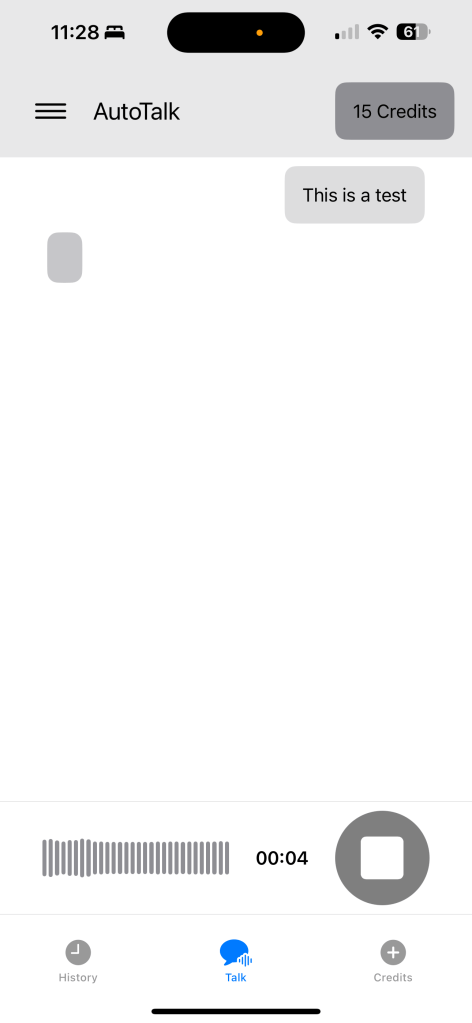
Day 1 I completed a proof of concept on the client side building the base UI, making calls to ChatGPT and generating TTS audio that is read aloud. I was also very proud of the waveform showing the input volume (thanks ChatGPT for that code).
Day 2 I moved all of the API calls for ChatGPT and TTS to a server side application. I set up a database with Supabase for the first time as well so I could track users and how many credits they have. I implemented the API handlers on the client side and got it all hooked up. End of day 2 I can record input, send it to the server for processing, deduct credits based on input/output character count, and return the TTS audio back to the client.
Day 3 and beyond I’ll move into building the in app purchase system for adding credits, implement conversation history, and refine the UI.
Below is a screenshot after day 2.
 OnTheFly Creations